> ## Documentation Index
> Fetch the complete documentation index at: https://dev.jup.ag/docs/llms.txt
> Use this file to discover all available pages before exploring further.
# Firewall
> Set rules to limit, rate-limit, or block traffic to your API keys at the gateway.
An API key used in a browser, mobile app, or other client-side code is not secret. Anyone can read it from network traffic and reuse it. Firewall rules let you control which requests the gateway allows, blocks, or rate-limits for a team's traffic.
Firewall rules match on request attributes: path, IP, country, method, headers, and API key. They apply to all traffic for the team. To restrict what a single key can call, use [API Key Permissions](/portal/api-keys#permissions) instead.
Common uses:
* **Limit an exposed key** to the few endpoints and regions you actually use, so a leaked key cannot reach the rest.
* **Block abuse** by rate-limiting or denying an IP, country, or key that sends too many requests.
* **Exempt trusted traffic**, such as your own backend, from the rules that apply to everyone else.
## How firewall rules work
A rule has three parts:
1. **Name** so you can find it later in the rules list, logs, and analytics.
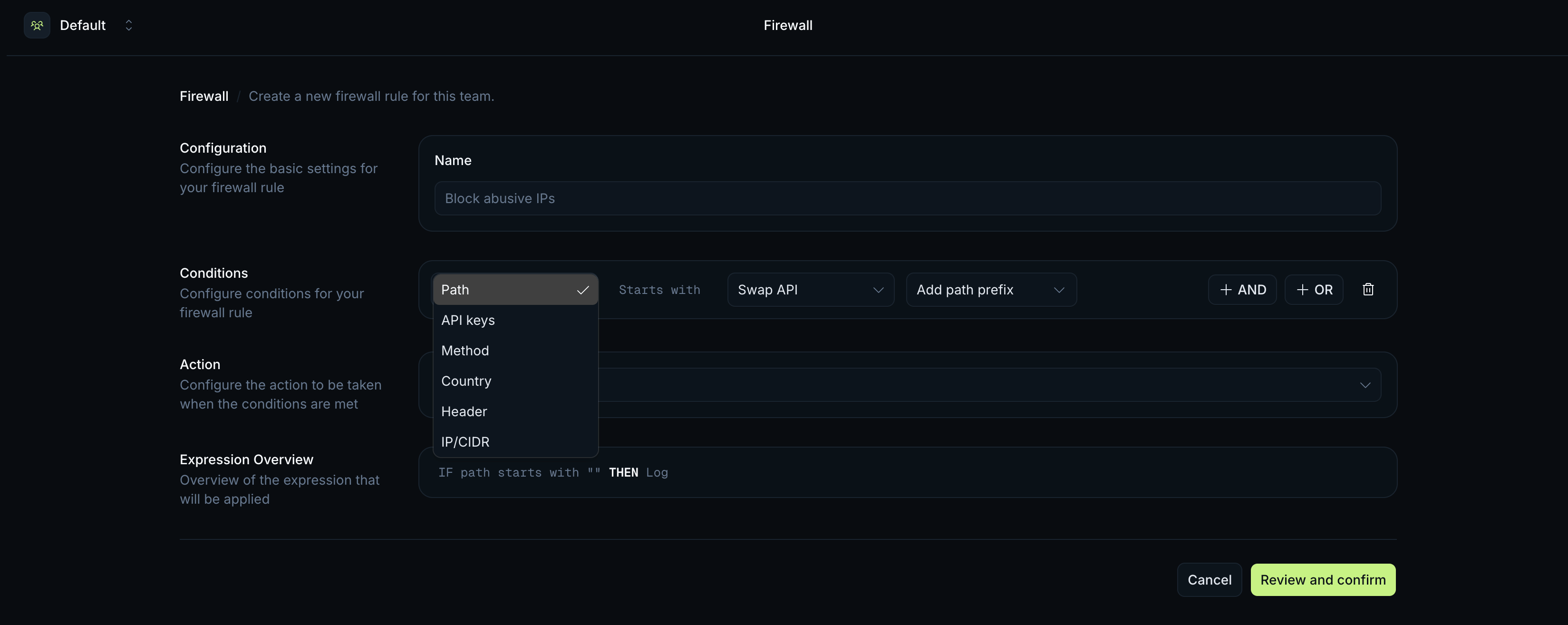
2. **Conditions** a request must match. A rule can have several, combined with `AND`/`OR`.
3. **Action** that runs when a request matches.
Rules belong to a team and apply at the gateway. Each rule has an enabled toggle, on by default, so you can switch a rule off without deleting it. A team can have up to **50 rules**, counting every rule that is not deleted, enabled or disabled. Disabling a rule does not free a slot, so delete a rule to make room for another.
A request can match more than one rule. Every match is recorded, but one rule decides the outcome. The winning rule is chosen by:
1. **Action precedence:** `Bypass` > `Deny` > `Rate limit` > `Log`.
2. **Specificity:** the number of distinct condition types (path, IP, country, method, headers, API key) in the matched group. A rule with path + country (2) beats a rule with only path (1).
3. **Age:** when specificity is equal, the older rule wins.
A `Bypass` match wins over any `Deny` or `Rate limit` the request also matches, and skips the firewall rate-limit checks.
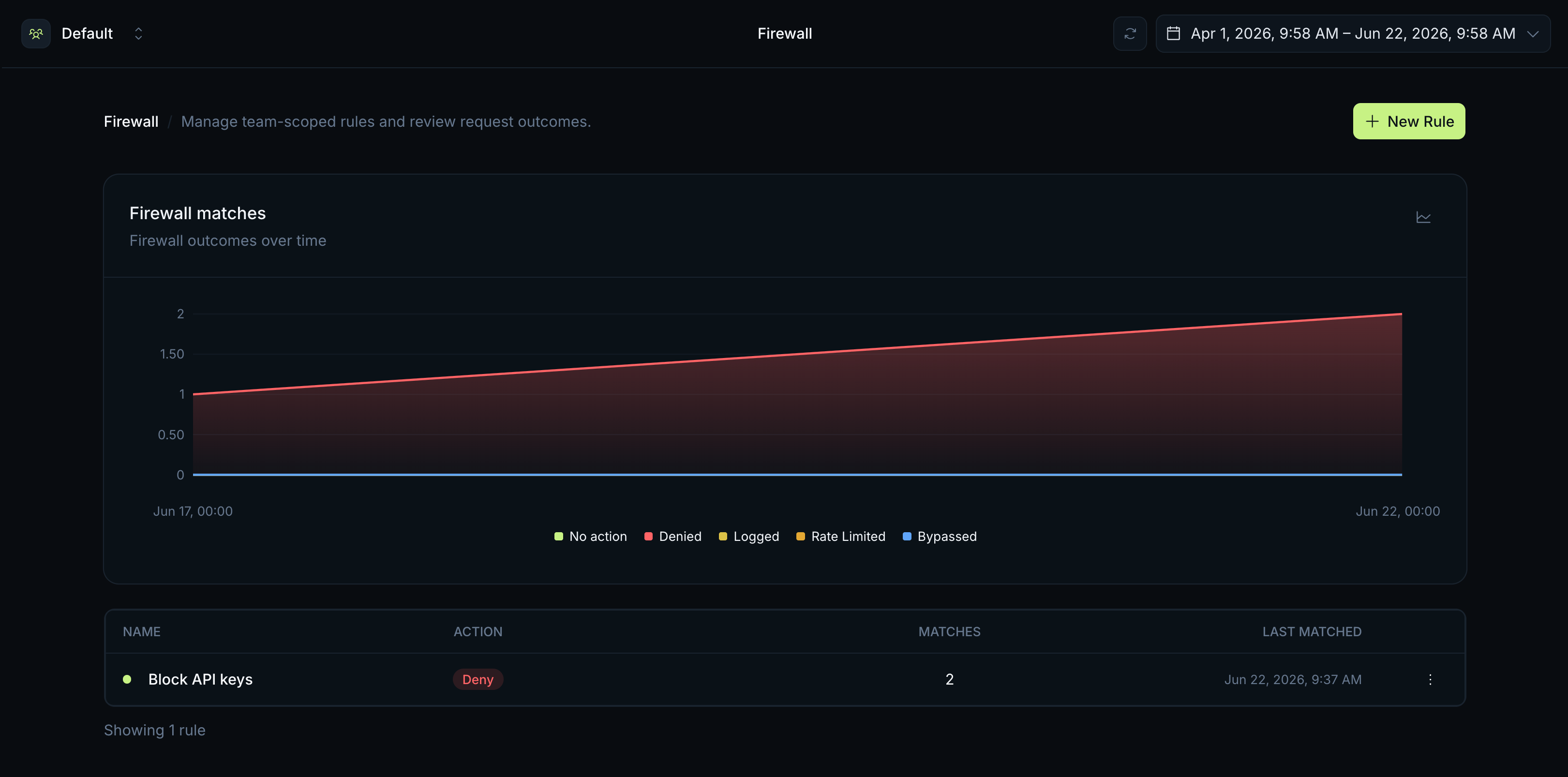
Every decision is recorded. The outcome and matching rules appear in [request logs](/portal/logs) and [Firewall analytics](/portal/analytics#firewall-analytics), and changes to a rule appear in the [audit log](/portal/security#audit-log).
## Create your first rule
In [Portal](https://developers.jup.ag/portal), switch to the team you want to protect, then open **Firewall**. Rules apply only to the selected team.
Give it a descriptive name, for example `Block non-swap paths on web key`.
Pick a condition type and set its value. Add more if you need them, grouped with `AND` (all must match) or `OR` (any can match). See [Conditions](#conditions).
Pick `Log`, `Deny`, `Rate limit`, or `Bypass`. For `Rate limit`, set the count, the window, and the scope. See [Actions](#actions).
Read the `IF … THEN …` [Expression Overview](#expression-overview), then confirm. New rules are enabled by default.
Set a new rule to `Log` first. It records matches without blocking anything, so you can see what the rule catches before you switch it to `Deny` or `Rate limit`.
## Conditions
Each condition matches a request against one attribute. Combine them with `AND`/`OR`.
| Condition | Operator | Matches |
| :--------- | :---------- | :---------------------------------------------------------------------------- |
| `Path` | starts with | The request path prefix, for example `/swap` or `/price`. |
| `API keys` | is any of | The API key used on the request. |
| `Method` | is any of | The HTTP method, for example `GET` or `POST`. |
| `Country` | is any of | The country the request comes from, chosen by name (up to 50). |
| `Header` | Equals | A request header name and its exact value. The value match is case-sensitive. |
| `IP/CIDR` | is any of | A client IP address or CIDR range. |
For example, `Path starts with /swap` `AND` `Country is any of United States, United Kingdom` matches only swap requests from those two countries.
Reserved and internal headers cannot be used in a `Header` condition. One condition group can match up to 5 header values, combined with `OR`.
 ## Actions
Each rule has one action.
| Action | What it does |
| :----------- | :--------------------------------------------------------------------------------------------------------------------------------------- |
| `Log` | Records the match. The request is allowed through. |
| `Deny` | Blocks the request and returns `403 Forbidden` with the message `Request blocked by firewall`. |
| `Rate limit` | Allows matching traffic up to a set count per window, then returns `429 Too Many Requests`. See [Rate-limit scopes](#rate-limit-scopes). |
| `Bypass` | Lets matching requests through and skips the firewall's rate-limit checks. Use it for traffic you trust, such as your own backend IPs. |
A `Bypass` rule needs at least one condition, so it cannot match every request. Otherwise a single rule could switch off your whole firewall.
### Rate-limit scopes
The `Rate limit` action allows **N requests per window** (in seconds or minutes) for traffic that matches the rule. The scope decides who that limit applies to:
| Scope | Behaviour |
| :-------------- | :--------------------------------- |
| Per **IP** | Each client IP gets its own limit. |
| Per **API key** | Each API key gets its own limit. |
| Per **Team** | The whole team shares one limit. |
For example, a rule on `Path starts with /tokens/v2/search` set to 30 requests per 60 seconds per **IP** lets each visitor make 30 searches a minute. The same rule scoped per **Team** caps total search traffic across all your users.
A firewall rate limit stacks on top of your plan's [rate limit](/portal/rate-limits): a request can be within your plan quota and still get a `429` from a firewall rule.
## Expression Overview
As you build a rule, Portal shows a plain-language `IF … THEN …` version of it. Condition groups are wrapped in parentheses and joined with `OR`; conditions inside a group are joined with `AND`.
```
IF (path starts with /swap AND method is POST)
THEN Deny
```
```
IF (path starts with /tokens/v2/search)
THEN Rate limit to 30 requests per 60s (per ip)
```
Check it before you save to spot a misplaced `AND`/`OR` or the wrong action.
## Outcomes
The action decides the response:
| Action | Response |
| :---------------------------- | :-------------------------------------------------------------------------------- |
| `Deny` | `403 Forbidden`, body `{ "code": 403, "message": "Request blocked by firewall" }` |
| `Rate limit` (over the limit) | `429 Too Many Requests`, body `{ "code": 429, "message": "Too many requests" }` |
| `Log` | No change to the response. The match is recorded only. |
| `Bypass` | No change to the response. The firewall rate-limit checks are skipped. |
A firewall `429` includes the same `x-ratelimit-remaining`, `x-ratelimit-current`, and `x-ratelimit-reset` headers as a plan rate limit. The body message tells the two apart: a firewall rule returns `Too many requests`, while the plan limit returns `[API Gateway] Too many requests`.
Each decision is visible after the request:
* **[Request logs](/portal/logs)** show the firewall outcome and matching rules for each request.
* **[Firewall analytics](/portal/analytics#firewall-analytics)** show outcomes over time and how often each rule matched.
* **[Audit log](/portal/security#audit-log)** records when firewall rules are created, updated, enabled, disabled, or deleted.
## Actions
Each rule has one action.
| Action | What it does |
| :----------- | :--------------------------------------------------------------------------------------------------------------------------------------- |
| `Log` | Records the match. The request is allowed through. |
| `Deny` | Blocks the request and returns `403 Forbidden` with the message `Request blocked by firewall`. |
| `Rate limit` | Allows matching traffic up to a set count per window, then returns `429 Too Many Requests`. See [Rate-limit scopes](#rate-limit-scopes). |
| `Bypass` | Lets matching requests through and skips the firewall's rate-limit checks. Use it for traffic you trust, such as your own backend IPs. |
A `Bypass` rule needs at least one condition, so it cannot match every request. Otherwise a single rule could switch off your whole firewall.
### Rate-limit scopes
The `Rate limit` action allows **N requests per window** (in seconds or minutes) for traffic that matches the rule. The scope decides who that limit applies to:
| Scope | Behaviour |
| :-------------- | :--------------------------------- |
| Per **IP** | Each client IP gets its own limit. |
| Per **API key** | Each API key gets its own limit. |
| Per **Team** | The whole team shares one limit. |
For example, a rule on `Path starts with /tokens/v2/search` set to 30 requests per 60 seconds per **IP** lets each visitor make 30 searches a minute. The same rule scoped per **Team** caps total search traffic across all your users.
A firewall rate limit stacks on top of your plan's [rate limit](/portal/rate-limits): a request can be within your plan quota and still get a `429` from a firewall rule.
## Expression Overview
As you build a rule, Portal shows a plain-language `IF … THEN …` version of it. Condition groups are wrapped in parentheses and joined with `OR`; conditions inside a group are joined with `AND`.
```
IF (path starts with /swap AND method is POST)
THEN Deny
```
```
IF (path starts with /tokens/v2/search)
THEN Rate limit to 30 requests per 60s (per ip)
```
Check it before you save to spot a misplaced `AND`/`OR` or the wrong action.
## Outcomes
The action decides the response:
| Action | Response |
| :---------------------------- | :-------------------------------------------------------------------------------- |
| `Deny` | `403 Forbidden`, body `{ "code": 403, "message": "Request blocked by firewall" }` |
| `Rate limit` (over the limit) | `429 Too Many Requests`, body `{ "code": 429, "message": "Too many requests" }` |
| `Log` | No change to the response. The match is recorded only. |
| `Bypass` | No change to the response. The firewall rate-limit checks are skipped. |
A firewall `429` includes the same `x-ratelimit-remaining`, `x-ratelimit-current`, and `x-ratelimit-reset` headers as a plan rate limit. The body message tells the two apart: a firewall rule returns `Too many requests`, while the plan limit returns `[API Gateway] Too many requests`.
Each decision is visible after the request:
* **[Request logs](/portal/logs)** show the firewall outcome and matching rules for each request.
* **[Firewall analytics](/portal/analytics#firewall-analytics)** show outcomes over time and how often each rule matched.
* **[Audit log](/portal/security#audit-log)** records when firewall rules are created, updated, enabled, disabled, or deleted.
 ## Related
Restrict a key to specific APIs to limit what a leaked key can do.
Inspect individual requests and the firewall decision for each.
Track firewall outcomes and rule matches over time.
See how plan limits and firewall rate limits combine.
## Related
Restrict a key to specific APIs to limit what a leaked key can do.
Inspect individual requests and the firewall decision for each.
Track firewall outcomes and rule matches over time.
See how plan limits and firewall rate limits combine.