> ## Documentation Index
> Fetch the complete documentation index at: https://dev.jup.ag/docs/llms.txt
> Use this file to discover all available pages before exploring further.
# Get Quote
> Get a swap route quote from the Metis routing engine.
**Metis Swap API** is no longer actively maintained and has been superseded by [Swap V2](/swap).
The `/swap/v1/quote` endpoint returns route plans from the Metis routing engine. Pass `inputMint`, `outputMint`, `amount`, and `slippageBps` to receive the best route with price impact and detailed swap info. The quote is the first step in the Metis swap flow.
The Quote API enables you to tap into the Metis Routing Engine, which accesses the deep liquidity available within the DEXes of Solana's DeFi ecosystem. In this guide, we will walkthrough how you can get a quote for a specific token pair and other related parameters.
**PLEASE USE THE METIS SWAP API AT YOUR OWN DISCRETION.**
The Jupiter UI at [https://jup.ag/](https://jup.ag/) contains multiple safeguards, warnings and default settings to guide our users to trade safer. Jupiter is not liable for losses incurred by users on other platforms.
If you need clarification or support, please reach out to us in [Discord](https://discord.gg/jup).
**ROUTING ENGINE**
The quotes from Metis Swap API are from the Metis Routing Engine.
## Let’s Get Started
In this guide, we will be using the Solana web3.js package.
If you have not set up your environment to use the necessary libraries and the connection to the Solana network, please head over to [Environment Setup](/get-started/environment-setup).
**API REFERENCE**
To fully utilize the Metis Quote API, check out the [Metis Quote API Reference](/api-reference/swap/quote).
## Metis Quote API
The most common trading pair on Solana is SOL and USDC, to get a quote for this specific token pair, you need to pass in the required parameters such as:
| Parameters | Description |
| ----------- | -------------------------------------------------------------------------------------------------------------------------------------------------------------------------- |
| inputMint | The pubkey or token mint address e.g. So11111111111111111111111111111111111111112 |
| outputMint | The pubkey or token mint address e.g. EPjFWdd5AufqSSqeM2qN1xzybapC8G4wEGGkZwyTDt1v |
| amount | The number of **input** tokens before the decimal is applied, also known as the “raw amount” or “integer amount” in lamports for SOL or atomic units for all other tokens. |
| slippageBps | The number of basis points you can tolerate to lose during time of execution. e.g. 1% = 100bps |
## Get Quote
Using the root URL and parameters to pass in, it is as simple as the example code below!
Fetch a quote for 1 SOL to USDC with 0.5% slippage:
```js theme={null}
const quoteResponse = await (
await fetch(
'https://api.jup.ag/swap/v1/quote?' +
'inputMint=So11111111111111111111111111111111111111112' +
'&outputMint=EPjFWdd5AufqSSqeM2qN1xzybapC8G4wEGGkZwyTDt1v' +
'&amount=100000000' +
'&slippageBps=50' +
'&restrictIntermediateTokens=true' +
'&instructionVersion=V2'
),
{
headers: {
'x-api-key': 'your-api-key',
},
}
).json();
console.log(JSON.stringify(quoteResponse, null, 2));
```
Example response:
```json expandable theme={null}
{
"inputMint": "So11111111111111111111111111111111111111112",
"inAmount": "100000000",
"outputMint": "EPjFWdd5AufqSSqeM2qN1xzybapC8G4wEGGkZwyTDt1v",
"outAmount": "16198753",
"otherAmountThreshold": "16117760",
"swapMode": "ExactIn",
"slippageBps": 50,
"platformFee": null,
"priceImpactPct": "0",
"routePlan": [
{
"swapInfo": {
"ammKey": "5BKxfWMbmYBAEWvyPZS9esPducUba9GqyMjtLCfbaqyF",
"label": "Meteora DLMM",
"inputMint": "So11111111111111111111111111111111111111112",
"outputMint": "EPjFWdd5AufqSSqeM2qN1xzybapC8G4wEGGkZwyTDt1v",
"inAmount": "100000000",
"outAmount": "16198753"
},
"percent": 100
}
],
"contextSlot": 299283763,
"timeTaken": 0.015257836,
"mostReliableAmmsQuoteReport": {
"info": {
"BZtgQEyS6eXUXicYPHecYQ7PybqodXQMvkjUbP4R8mUU": "16195832",
"Czfq3xZZDmsdGdUyrNLtRhGc47cXcZtLG4crryfu44zE": "16190214"
}
}
}
```
**TIP**
`outAmount` is the best output amount after deducting AMM fees and platform fees. It does not account for slippage. `otherAmountThreshold` is the minimum acceptable output after applying `slippageBps` tolerance on `outAmount`.
## What’s Next
Now, you are able to get a quote, next steps is to submit a transaction to execute the swap based on the quote given. Let’s go!
## Additional Resources
### Route Debugging with mostReliableAmmsQuoteReport
The quote response includes `mostReliableAmmsQuoteReport`, which returns the markets that would have quoted for this pair. Each key in the `info` object is an AMM account address, and the value is the quoted output amount as a string.
This is useful for verifying that the routing engine selected the best path. Compare these quotes with the chosen route's `outAmount` to understand routing decisions. You can map AMM addresses to DEX labels using the [`/program-id-to-label`](/api-reference/swap/program-id-to-label) endpoint.
### Restrict Intermediate Tokens
`restrictIntermediateTokens` can be set to `true` . If your route is routed through random intermediate tokens, it will fail more frequently. With this, we make sure that your route is only routed through highly liquid intermediate tokens to give you the best price and more stable route.
### Legacy Transactions
All Jupiter swaps are using Versioned Transactions and [Address Lookup Tables](https://docs.solana.com/developing/lookup-tables). However, not all wallets support Versioned Transactions yet, so if you detect a wallet that does not support versioned transactions, you will need to set the `asLegacyTransaction` parameter to `true`.
### Adding Fees
By using the Quote API in your app, you can add a fee to charge your users. You can refer to the `platformFeeBps` parameter and to add it to your quote and in conjuction, add `feeAccount` (it can be any valid token account) to your swap request.
### Direct Routes
In some cases, you may want to restrict the routing to only go through 1 market. You can use the `onlyDirectRoutes` parameter to achieve this. This will ensure routing will only go through 1 market.
**NOTE**
* If there are no direct routes, there will be no quote.
* If there is only 1 market but it is illiquid, it will still return the route with the illiquid market.
**UNFAVORABLE TRADES**
Please be aware that using `onlyDirectRoutes` can often yield unfavorable trades or outcomes.
### Max Accounts
In some cases, you may want to add more accounts to the transaction for specific use cases, but it might exceed the transaction size limit. You can use the `maxAccounts` parameter to limit the number of accounts in the transaction.
**UNFAVORABLE TRADES**
Please be aware that the misuse of `maxAccounts` can yield unfavorable trades or outcomes.
**TIP**
Refer to the [Requote with Lower Max Accounts](/swap/requote-with-lower-max-accounts) guide for more information on how to requote and adjust the swap when using `maxAccounts`.
**NOTE**
* `maxAccounts` is an estimation and the actual number of accounts may vary.
* `maxAccounts` only applies to the total number of accounts of the inner swaps in the swap instruction and not any of the setup, cleanup or other instructions (see the example below).
* We recommend setting `maxAccounts` to 64
* Keep `maxAccounts` as large as possible, only reduce `maxAccounts` if you exceed the transaction size limit.
* If `maxAccounts` is set too low, example to 30, the computed route may drop DEXes/AMMs like Meteora DLMM that require more than 30 accounts.
**Jupiter has 2 types of routing instructions**, if you plan to limit `maxAccounts`, you will need to account for if the market is routable with [ALTs](https://docs.solana.com/developing/lookup-tables) or not:
* **`Routing Instruction`** (Simple Routing): The market is still new, and we do not have ALTs set up for the market, hence the number of accounts required is higher as there are more accounts required.
* **`Shared Accounts Routing Instruction`**: The market has sufficient liquidity (and has been live for a while), and we have [ALTs](https://docs.solana.com/developing/lookup-tables) set up for the market to be used in the routing instruction, hence the number of accounts required is lower as there are less accounts required.
[In this transaction](https://solscan.io/tx/2xpiniSn5z61hE6gB6EUaeRZCqeg8rLBEbiSnAjSD28tjVTSpBogSLfrMRaJiDzuqDyZ8v49Z7WL2TKvGQVwYbB7):
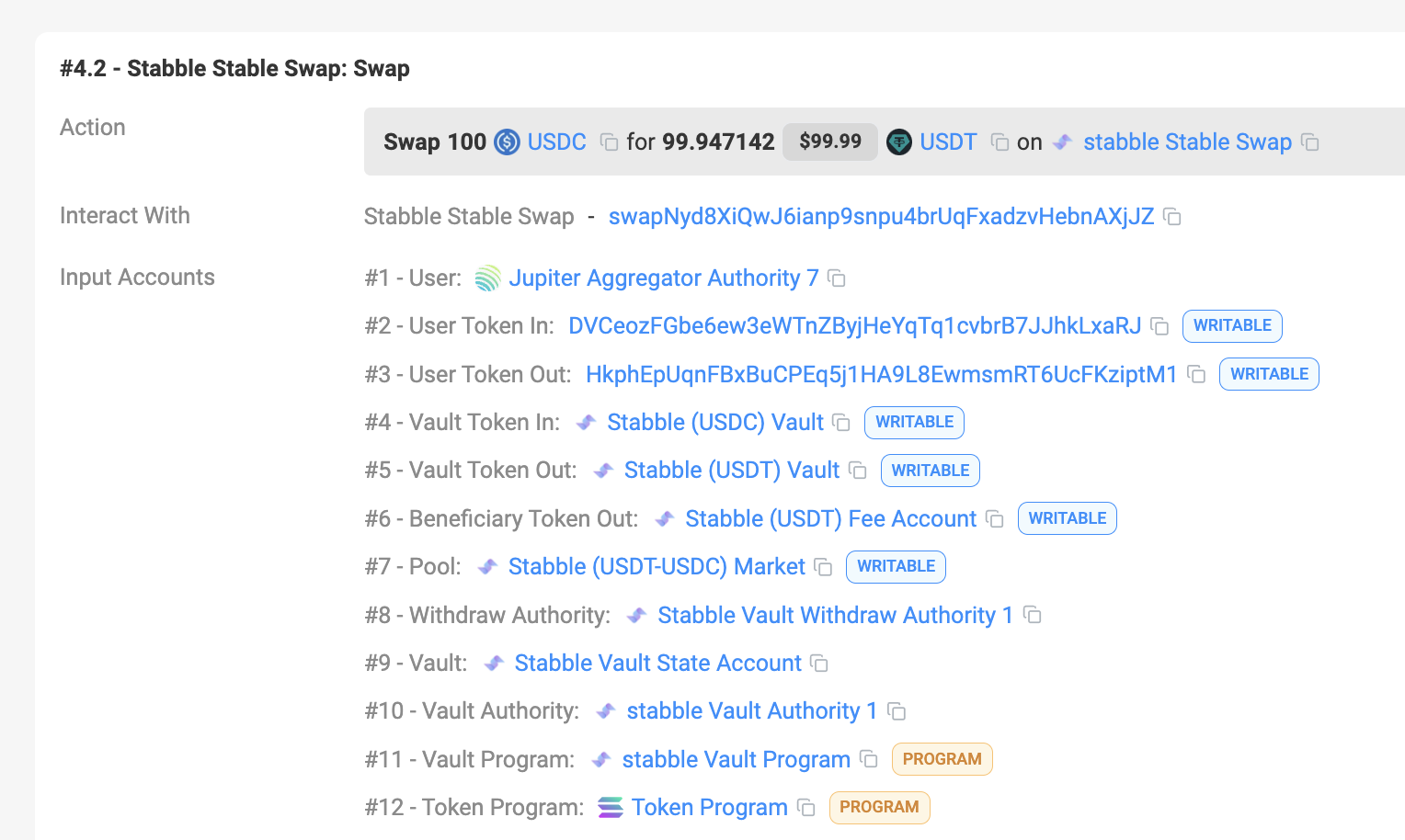
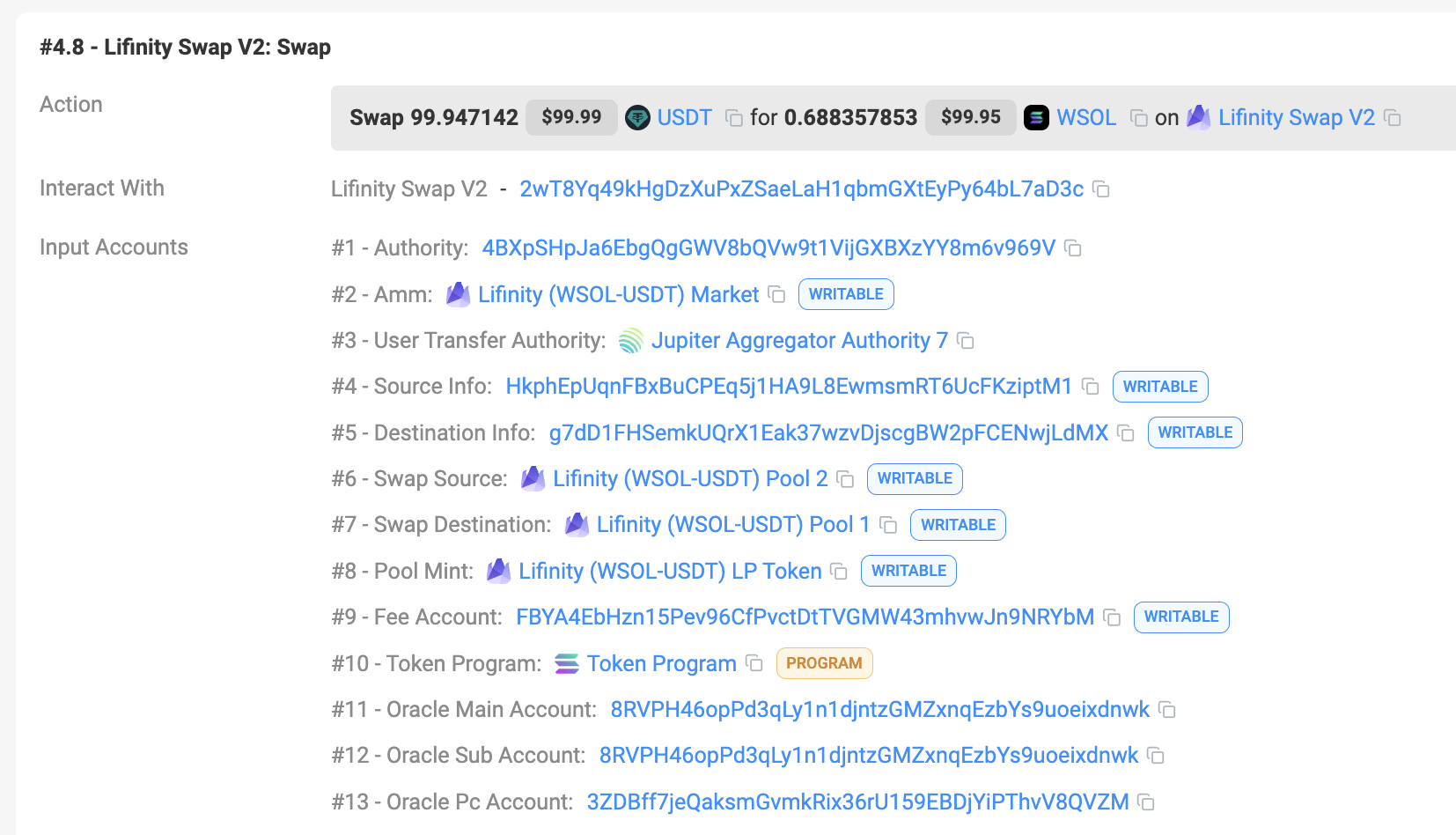
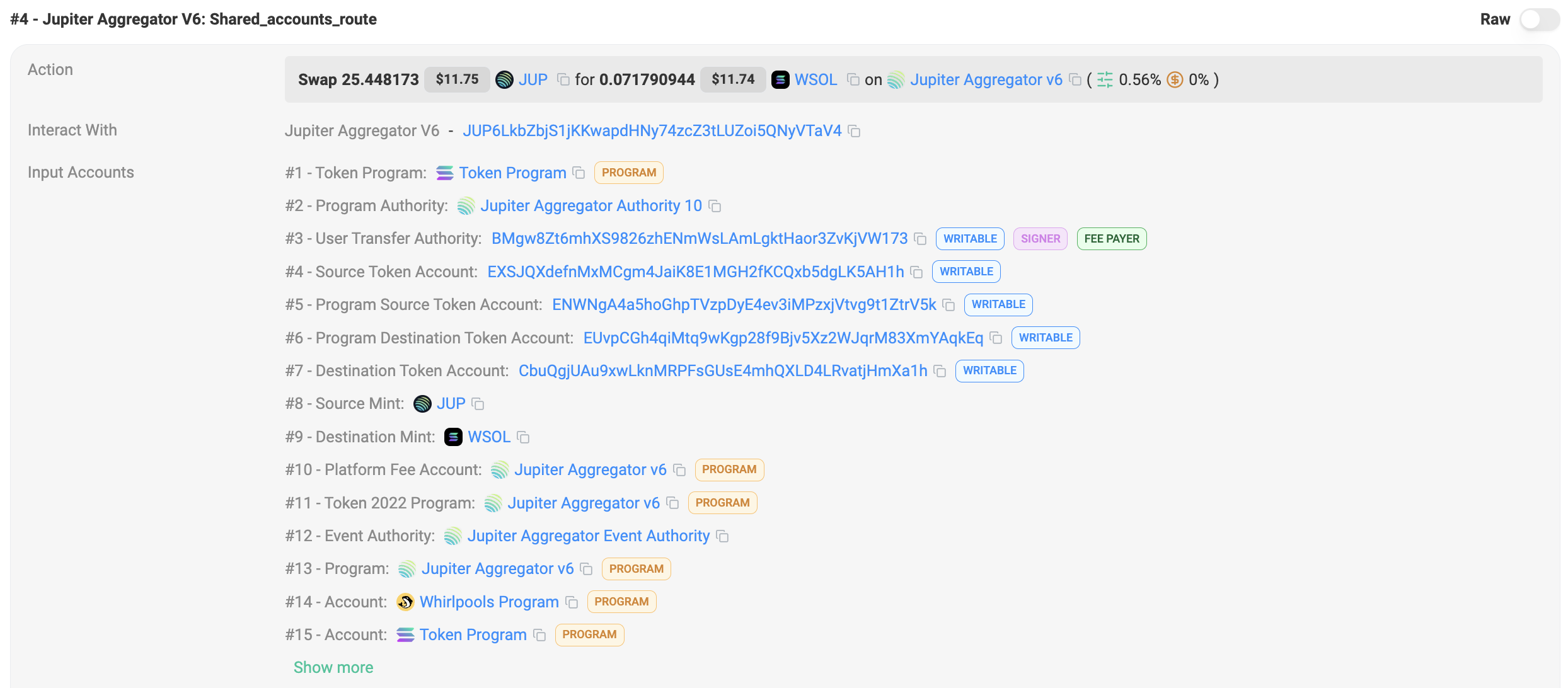 * You can see that there are a total of 2 inner swaps where the number of accounts respectively are
* Stabble Stable Swap: 12
* Lifinity Swap V2: 13
* Total: 25
* The `maxAccounts` parameter is to control this value - to limit the total number of accounts in the inner swaps.
* It doesn’t take into the consideration of a few things:
* Each of the inner swap's program address, so 2 in this case.
* Top level routing instruction accounts where in this case Shared Accounts Route is 13 and Route is 9.
* There are also other accounts that are required to set up, clean up, etc which are not counted in the `maxAccounts` parameter
Notes:
* Values in the table are only estimations and the actual number of accounts may vary.
* Min accounts are needed when we have already created the necessary [ALTs](https://docs.solana.com/developing/lookup-tables) for a specific pool resulting in less accounts needed in a Shared Accounts Routing context.
* Sanctum and Sanctum Infinity are unique, and their accounts are dynamic.
| DEX | Max | Min |
| :-------------------- | :-- | :-- |
| Meteora DLMM | 47 | 19 |
| Meteora | 45 | 18 |
| Moonshot | 37 | 15 |
| Obric | 30 | 12 |
| Orca Whirlpool | 30 | 12 |
| Pumpfun AMM | 42 | 17 |
| Pumpfun Bonding Curve | 40 | 16 |
| Raydium | 45 | 18 |
| Raydium CLMM | 45 | 19 |
| Raydium CPMM | 37 | 14 |
| Sanctum | 80 | 80 |
| Sanctum Infinity | 80 | 80 |
| Solfi | 22 | 9 |
* You can see that there are a total of 2 inner swaps where the number of accounts respectively are
* Stabble Stable Swap: 12
* Lifinity Swap V2: 13
* Total: 25
* The `maxAccounts` parameter is to control this value - to limit the total number of accounts in the inner swaps.
* It doesn’t take into the consideration of a few things:
* Each of the inner swap's program address, so 2 in this case.
* Top level routing instruction accounts where in this case Shared Accounts Route is 13 and Route is 9.
* There are also other accounts that are required to set up, clean up, etc which are not counted in the `maxAccounts` parameter
Notes:
* Values in the table are only estimations and the actual number of accounts may vary.
* Min accounts are needed when we have already created the necessary [ALTs](https://docs.solana.com/developing/lookup-tables) for a specific pool resulting in less accounts needed in a Shared Accounts Routing context.
* Sanctum and Sanctum Infinity are unique, and their accounts are dynamic.
| DEX | Max | Min |
| :-------------------- | :-- | :-- |
| Meteora DLMM | 47 | 19 |
| Meteora | 45 | 18 |
| Moonshot | 37 | 15 |
| Obric | 30 | 12 |
| Orca Whirlpool | 30 | 12 |
| Pumpfun AMM | 42 | 17 |
| Pumpfun Bonding Curve | 40 | 16 |
| Raydium | 45 | 18 |
| Raydium CLMM | 45 | 19 |
| Raydium CPMM | 37 | 14 |
| Sanctum | 80 | 80 |
| Sanctum Infinity | 80 | 80 |
| Solfi | 22 | 9 |